
Phone case collages
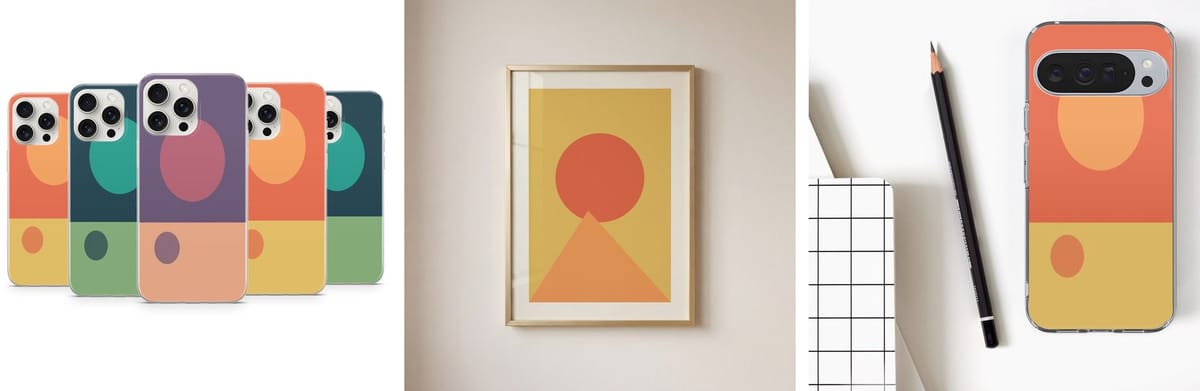
Drop designs 1–5 and get a five-phone collage as the main photo plus a single view of each design, on the ready iPhone and Pixel templates or your own.
Upload the PSD mockups you already use, once. Listing Desk puts every design into them on our server — phone case collages, tough case views, framed posters — for a whole folder at a time, and keeps the print files with each listing. No Photoshop open, no actions to run.
Set the templates up once per shop; after that every design set gets the same photos.
Drop your poster or phone case PSDs on the Mockup templates page. The poster goes into the smart object named INPUT; phone case sets use Design 1–5.
Tick the templates and a background — as in the template, a colour, your own image or transparent — and save them as the shop's defaults.
One design set to try it, or a parent folder with one sub-folder per set. Folders render in the background with live progress.
Each set is saved as a listing with its mockups as photos and the originals as print files — or download one zip with a folder per set.
Built around the products print-on-demand sellers list most.
Drop designs 1–5 and get a five-phone collage as the main photo plus a single view of each design, on the ready iPhone and Pixel templates or your own.
Upload tough case PSDs and each becomes a template: one view per design, or a collage of all five. Designs are fitted to cover the case, never stretched.
Your framed poster PSDs, with the poster fitted into the frame and the PSD's own background kept. Click the mockups in order — the first is the main photo — and try them with one poster.
A whole folder of design sets in one go, rendered in parallel on our server. Poster batches number every poster for you: 1.png, 1A.jpg, 1B.jpg…
The original designs stay with each listing as print files, never shown on Etsy. For Alerio tough cases the print file is scaled and centred to the 2000 × 3400 px Alerio prints from.
Choose once per shop which picture is the main photo, which follow and which are left out. Every listing of that shop gets the same set, in the same order.
Buyers recognise a shop by its photos. Generic mockup sites give everyone the same rooms and the same hands; with your own PSDs your listings keep the look you built. Layers above the design keep their blend mode, so a shadow darkens the print instead of covering it, and the background can stay as in the template or change per shop.
Mockups are made on our server, so a VA without Photoshop can make them too, and a whole batch keeps rendering while you do something else. Batches save straight into listings: each set is attached to the saved listing with the same name in the chosen shop, or a new one is created — ready for the AI to write its text.
Selling posters with Gelato? The Gelato posters page checks every image against each size of your Gelato template first — how much is cropped and the print resolution at the biggest size — and flags odd ratios and low-resolution files. Mockup renders count toward your plan's monthly renders, pooled across all your shops.
Not to make mockups. You only need the PSD files; Listing Desk renders them on the server. If you already make mockups with a Photoshop action, you can import its OUTPUT folder instead.
Poster and frame mockups (PSD or PSB) with a smart object for the artwork — named INPUT, or Poster, Artwork or Design. Phone case mockups with smart objects named Design 1–5 for a set; a PSD with one design works too.
Yes: keep the template's own, pick a colour, use your own image or make it transparent. Save it as a shop's default and every listing of that shop uses it.
They stay with each listing for your orders and are never uploaded to Etsy as photos. Shops → Print files lets you download them or replace them when your printer needs new ones.
Each part works on its own and even better together — from a folder of designs to a shipped order.
Create listings from design folders, send many drafts, schedule publishing and bulk edit live listings.
Learn moreTitles, 13 tags and descriptions written from your design, in each shop's style, with a listing score.
Learn moreAll your shops and your VA team in one workspace, with tasks and approval before Etsy.
Learn moreOrders matched to design files and sent to Alerio or any partner, with tracking back to Etsy.
Learn moreWhat every page in the app is for, in plain words — the same help you see inside the app.
Read the guideStart a free trial, upload one of your PSD mockups and render a folder of designs. Questions first? Email [email protected].